Note: All stuff posted here, is for the educational purpose only. If anyone misuses the info, the management of the OFF Club can not be held responsible and shall stand withdrawn from any damages which may arise as a result of mishandling of the info; hence it is advised to use them at your own risks and cost. Thanks for your patience and cooperation.
Showing posts with label Feature. Show all posts

Thursday, September 25, 2008

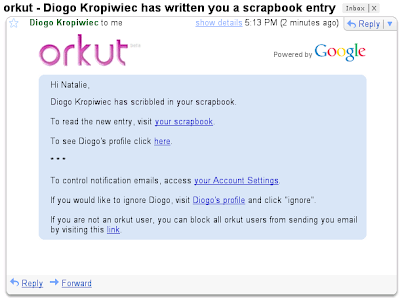
A new look for orkut emails

We are constantly working to make your orkut experience better, and while this includes adding new, useful features on the site, like new search features and support for applications, it also includes improving your experience when you are not logged-in to orkut.com. Recently we released a better orkut experience for your smartphone, and now you'll see snazzier emails from orkut.

We decided it was time to change our emails to give them a look and feel more like orkut.com pages. We started by giving a new look to the emails that are associated with orkut's most popular features: scrap alerts, testimonials, friend requests, photo tagging, crushes and teaser alerts, as well as the emails for social events, which is a brand new feature.

Now, you will be able to feel like you're inside orkut even before you click the links sent in our e-mails.


If you enjoyed this post, make sure you subscribe to my regular Email Updates!

Thursday, August 7, 2008

New Feature: Orkut SMS

Orkut has launched a great new feature which will enable you to receive new scrap notifications via sms.

Let us help find and configure this feature for you…

Go To mobile setting page in your orkut profile settings in order to configure this feature for your orkut profile. This new feature is available in India and Brazil only. (Also Not All Network Operators For Both Countries)

Please Note - You will have to pay for this feature (sms charges).

What is orkut SMS?
orkut SMS allows you to stay in touch with your orkut friends using text messages from your mobile phone.

How does orkut SMS work?
1. Register your phone on the orkut website.
2. Send SMS commands from your phone to the appropriate orkut SMS number.


SMS numbers
Brazil:

67588 (Amazônia Celular, Brasil Telecom, Claro, Oi, Telemig Celular, TIM, and Vivo only)

India: Please check the mobile tab on your orkut settings page.
Other countries: Not Available


Pricing

Messages sent 2 INR (all carriers except MTNL, which is 1 INR)
Notifications received Free up to your monthly limit

Please note: orkut SMS is a premium service and you will be charged by your mobile provider. These prices are subject to change by the provider at any time.


SMS commands
on or off Turn on/off SMS notifications of new scraps
on
reset Reset your quota limit
reset
unregister Unregister SMS service
unregister
scrap Send a scrap to one of your orkut friends
scrap bob smith Have a nice day!!
contact View the contact information (phone number, email, IM, and address) of an orkut friend
contact bob smith

This Article Was Published Partially At Orkut Plus.


If you enjoyed this post, make sure you subscribe to my regular Email Updates!

Sunday, July 27, 2008

Update on recent Orkut maintenance

Many of you may have noticed or heard from friends that orkut experienced some downtime. On Monday July 21st we discovered a bug that affected the profiles of a small set of orkut users. Starting at 14:30 PST, our engineering team disabled access to orkut.com while we worked on this issue. We brought orkut.com back up as soon as the bug was fixed, although we temporarily disabled a small number of profiles while we were restoring them. Less than .1% of all orkut users were impacted.

At no time was any user's login information at risk. Additionally, our team has fixed any impacted accounts automatically. As always, you should not click on any links that you receive in your messages folder, scrapbook, or email as we are already taking care of this bug.

At this time, we have notified all impacted users on their orkut homepage (see example below). If you have not received this notification from our team, then your account was not affected. Your safety and security on orkut is the number one priority for our team, so we wanted to be as transparent with you as possible. It's important that we continue to work with our users to provide a safe community for all to enjoy!


If you enjoyed this post, make sure you subscribe to my regular Email Updates!

New orkut search filters

You may have noticed that lately it's been easier to find what you're looking for when searching on orkut. For example, when you search for a person, we now show people in your network or country at the top of the results list , and we also suggest other terms if we think you've misspelled something. We're always looking to improve search on okrut, which is why we just launched some new search filters that we hope will further aid your searches. Here's how search filters work:

Say you are trying to find a person you met yesterday, but you can't remember his or her complete name. As always, you can type in what you remember of the person's name and hit search. After that, you can refine your search by applying the filters that appear on the right side of our search page. You might start by restricting the search to the languages you speak or the country you're in. To get even better results, try restricting by gender, age, relationship status, children or sexual preference. The more filters you combine, the more specific results will you get.

If you're searching for a community, you can now refine your results to communities that focus on only one specific category. This may help you find what you're looking for faster.


If you enjoyed this post, make sure you subscribe to my regular Email Updates!

Tuesday, June 24, 2008

Drag and drop to customize your profile page

Orkut profiles have become a lot more dynamic in the last year. Not only are your photos, videos, and testimonials showcased on your profile, but now users in many parts of the world can also add OpenSocial applications to their profiles. With so many new elements on the profile page, we've received feedback that you'd like to be able to arrange it as you wish.

So, to help you organize all this content and show your visitors the elements you most want them to see, we've rolled out new functionality. Here's a couple of things you can now do:
  1. Reorganize your profile page with drag-and-drop: Simply click on any of the applications or showcases (photos, videos, and testimonials) on your profile page and drag them around until they are just as you'd like. The new layout of your profile page will automatically be saved, so your profile visitors will see everything just as you want it.
  2. Put as many or as few applications on your profile as you want. Until now, you were able to display up to three applications on your profile, and some of you wanted to show more. Now, when you add an application, you can choose whether or not you want it on your profile. Just select or unselect the "Add to my profile" box above the big "Add Application" button. You can change this any time with the "tool" button in the upper-right corner of the application.
So go ahead and rearrange your profile and make it your own...and if that's not enough, why not add a theme as well!?


If you enjoyed this post, make sure you subscribe to my regular Email Updates!

Friday, May 9, 2008

What's new with you? 'Status Message'

Are you headed off on a big trip? Want to share your excitement about a favorite sports team's recent championship? Inviting your friends to a party you're having tonight? Recently we launched status messages on orkut profiles that let you do just that.


It is simple, quick and easy: go to your profile, type whatever you want to appear as your status in the box right below your name, and it is done! Now whoever views your profile can view your latest news.


If you enjoyed this post, make sure you subscribe to my regular Email Updates!

Thursday, May 1, 2008

Reorder and organize your pictures in orkut albums

Now that we have more capacity for you to upload your photos (if you haven't tested the limit lately, you can now upload up to 10,000 pictures), we've also upgraded our photo album features. For example, until now, you had to delete and re-upload photos to change the order of photos in your albums. To make this easier, we launched a 'reorder photos' functionality which lets you organize the your pictures directly in orkut. If you want to mix things up in your albums, select the album you'd like to modify, click on "reorder photos," then simply drag and drop your photos until you have it just right.


If you enjoyed this post, make sure you subscribe to my regular Email Updates!

Tuesday, April 29, 2008

Privacy Feature Update

This week we are adding additional flexibility for you to manage the privacy of your testimonials, videos, scrapbook and feeds. In addition to having your privacy settings to be just "friends" or "everyone," you can now select also "friend of friends." We feel that this is a good choice for those of you who may wish to share your information with an extended group of friends without making it public to everyone. We hope this additional flexibility helps you manage your experience on orkut better.


If you enjoyed this post, make sure you subscribe to my regular Email Updates!

Friday, April 11, 2008

'New Update' Refined and Advanced Orkut Search

Here you go, A really advance and refining search has been introduced by Orkut. Type anything and you will possible results in embed window as shown in screen shot. The New Feature / Update is not for all user now, but it will be available for all very soon. So, Get Ready For Searching your friend none of them can hide their self now. ☺


If you enjoyed this post, make sure you subscribe to my regular Email Updates!

Wednesday, April 2, 2008

The continued search for better search in orkut


orkut may be all about your social connections, but Google is a search company at heart -- so we're always looking for ways to improve our orkut search features. Here are some of the latest improvements:
  1. We are now making a greater effort to guess what you are looking for. In the past, you may have noticed that a more general search on orkut didn't always provide you the results you were hoping for. If you searched for a friend named Navneet, you may have found that the first results were for communities called "navneet." We've spent some time working on this and think you'll see better results more often now. So go ahead and try it here.
  2. Just as with Google search, we'll now suggest a correction if we think you've misspelled your search words. You can see an example here.
  3. We now take into account the country, state and city listed in your profile when searching on orkut, so you'll get the other Navneets from Maharashtra (if that's where you live), even if you have it listed as MH.
To help make these search improvements really effective, remember to keep your profile up to date.


If you enjoyed this post, make sure you subscribe to my regular Email Updates!

Monday, March 31, 2008

The latest updates from your friends

Now you can more control over which friends' updates appear on your homepage. First, organize your friends in groups. You can do that by clicking on friends in the header and then creating groups and putting your friends in them. To select which groups you want updates from, click settings in the left navigation, and then select the appropriate groups from the "updates from my friends" section. Once you've done this, only the updates of your selected groups will be shown on your homepage. If you decide you want to see more updates, you can still access all your friends' updates by clicking "view more" on the bottom of your homepage.

And if you'd prefer not have any of your updates appear on your friends' homepages, go to settings and click on privacy to set your own actions as private.


If you enjoyed this post, make sure you subscribe to my regular Email Updates!

Thursday, February 28, 2008

Hack Is Back - Add More Than 1000 Friends on Orkut


Thanks to Orkut's New Feature - Manage Friends, members having over 1000 friends can accept friend requests. This is a possible bug since members having reached the limit cannot add more friends. You can always invite others to add you and then accept their request.


How others can add me as their friend?


It is evident that you cannot send an add request if you have reached the 1000 friends limit. You can always request others to add you though.

Here are the step by step instructions which they should follow:


  • Enter email addresses to add as friend
  • Enter the Captcha
  • Submit

How Do i Accept Friend requests - I Have Reached The Limit?


  • Just choose the category and click yes to add as your friend. :o)


Note: Don't expect this bug to stay forever. This can be fixed anytime. On a positive note, this bug may no longer be a bug in future. Orkut is planning remove the friend limit in near future.


This Article Was Published At Orkut Plus


If you enjoyed this post, make sure you subscribe to my regular Email Updates!

Monday, February 11, 2008

Upload Multiple Images - Awesome New Feature


If you always wondered uploading 100 pics on orkut would consume an hell lot of time then here is some fantastic news. Orkut has introduced a new feature which allows you to upload multiple pics in a single click. So no more clicking, choosing and uploading individual images.


How to Upload Multiple Pics in One Click?


Note:
Does not work in Firefox. Use Internet Explorer to Use This Feature


This Article Was Published At Orkut Plus


If you enjoyed this post, make sure you subscribe to my regular Email Updates!

New Update - Your Last Login Details


Most of you must have noticed this update. Orkut has just rolled out this feature that displays your last login details on your homepage. As an obvious guess, i feel this is another security related update which can help members track unauthorized account usage aka account hijacking issues. Since members can now track their account activity, this will surely help in avoiding and reducing account hijacking issues.


This Article Was Published At Orkut Plus


If you enjoyed this post, make sure you subscribe to my regular Email Updates!

Content Privacy in Communities - Block Non Members from Viewing Your Community Topics


Community owners get more powers. They can now choose who gets to see the community topics and discussions. They can now block non-community members from viewing the content of the community. If we think optimistically, reputed communities can block non-members from viewing their content. This can lead to a surge of new members in the community if the owners use it wisely.


This Article Was Published At Orkut Plus


If you enjoyed this post, make sure you subscribe to my regular Email Updates!

Thursday, January 24, 2008

Orkut At 4!

You may have noticed that the orkut logo looked a little different when you signed in today -- and if the four candles on the cake didn't give it away already, it's our fourth birthday. That's right, 2/5ths of a decade ago, orkut launched. It has grown up pretty fast, with many more features, communities, friends and photos since it first opened as an invite-only community. Whether you've been with us for years or days, thank you for being a part of the orkut community!


If you enjoyed this post, make sure you subscribe to my regular Email Updates!

Saturday, January 12, 2008

Orkut Highlights for 2007

As we started the new year, we took some time to look back on the year for orkut. Sometimes we get so caught up looking forward to all the new features we want to launch, we forget to look back at what we have accomplished. If you've been on orkut since January, you may remember when you first saw these features. Or if you've joined more recently you may never have known the site without these favorites. So here are the highlights for this year by month - turns out orkut has come a long way!

In January, we launched our first mobile feature on orkut with orkut SMS integration with Claro, the Brazilian mobile carrier. Since then we have partnered with other mobile providers, and you can now send and receive scraps and find your friends' contact information if you have phone service with Amazônia Celular, Brasil Telecom, Claro, or Telemig Celular. If you still haven't signed up it's not too late to receive those new years scraps on your cell phone: just go to settings and click on the mobile tab.

February brought videos to orkut when we launched integration with Google Video and YouTube. People began copying and pasting URLs of their favorite videos onto the favorite videos page of their profiles. This has been one of the most popular feature launches ever. Since February you have added over 300 million videos to your profiles!

Orkut Buyukkokten, the creator of orkut.com, visited Brazil for the first time in March and spent three weeks touring the country, giving tech talks to hundreds of University Students, conducting focus groups and interviewing with the press. If you missed the visit you can check out the community and the photo album.

Community Polls were enabled in April. Since then people have been voting on topics from the best restaurants in their cities to the most important politician of their towns.

May brought feed integration, allowing you to bring in content from your favorite blogs, Picasa Web Albums or any other source that supports feeds. Still haven't added a feed? Why not add this blog so you always know the latest. Go to add stuff in the left navigation and add the URL.

You wouldn't be reading this if we hadn't launched this blog in June! In case you are bilingual, check out the blog in Portuguese as well.

We were honored to receive the award for "Best Social Networking Site!" from India PC World in July.

The biggest milestone for orkut, perhaps since the launch of the site, happened in August when we launched the visual redesign. This included a slight change to the colors, rounded corners, new icons and an easier-to-use navigation. While giving the site a facelift we also maintained the familiarity and simplicity you've enjoyed for years. Can you even remember the old orkut?

We revamped the site again in September to show updates from your friends right on your homepage. To show or hide your own updates go to the settings page.

In October, we went from allowing you to upload only 12 photos to your album to allowing 100 photos in your album. If you still haven't filled up your album, why not add your latest holiday photos?

This November, Google made the announcement that orkut would be opening up to developers through OpenSocial. If you're a software developer you can test out the platform by joining our Sandbox. We look forward to seeing what applications you're developing for orkut when we launch the platform to consumers next year.

As the year winded down in December, we launched new privacy features that allow you more control over who sees your photos, videos, testimonials and scraps.

Happy New Year orkuters-- we look forward to a great 2008!


If you enjoyed this post, make sure you subscribe to my regular Email Updates!

Thursday, December 13, 2007

Keeping more of your content private

Recently, we wrote about the new functionality that allows you to chose whether to let everyone or just your friends view your testimonials, videos and photos. And now, we're announcing that we've expanded privacy settings so you can now do the same with your scrapbook and feeds. Though some of us feel perfectly comfortable keeping our scraps open to the community, we know some of you are more private and would prefer to keep them among friends. How do we know? We've heard you in the help group and help center, and we've listened! Limiting who can view your scrapbook has been a long requested feature on orkut. To adjust your level of privacy, go to your settings page and click on "privacy". Thanks for the feedback, keep letting us know what you want to see from orkut!


If you enjoyed this post, make sure you subscribe to my regular Email Updates!

Tuesday, December 11, 2007

News: Ask rolls out search privacy tool

The AskEraser on the homepage
The AskEraser will feature prominently on the site
Search engine Ask has launched a feature that it hopes will prove a selling point for consumers concerned about their online privacy.

AskEraser allows users to immediately delete search queries stored on Ask's servers, in contrast to rivals such as Google which stores data for 18 months.

How personal data is used is becoming more of an issue as people live more of their lives via search engines.

Some are concerned about possible deals between search engines and ad firms.

In America consumer advocacy groups have expressed doubts about a proposed merger between Google and ad-serving company DoubleClick, which is currently being reviewed by US regulators.

Privacy issues

Jumping on the privacy bandwagon, Ask is offering users the chance to take charge of what happens with their search history.

An AskEraser link will feature prominently on the Ask.com homepage and, when enabled by the user, will delete all future search queries and associated cookie information from its servers.

The information it destroys includes IP address, user ID and session ID along with the complete text of a query.

Jim Lanzone, chief executive of Ask
Jim Lanzone hopes the tool will lure users concerned about privacy

"For people who worry about their online privacy, AskEraser now gives them control of their search information," said Jim Lanzone, chief executive of Ask.com.

But some critics have pointed out that it doesn't entirely erase all information, as search queries relating to advertisements supplied by Google will continue to be passed to the search rival.

Other search engines are attempting to quell concerns about privacy and most operate polices which mean search histories are deleted between a year and 18 months after they were made.

But some consumers are getting twitchy about how their data is shared, following some high-profile cases.

In August 2006 AOL was forced to apologise after it released the search queries of more than 650,000 of its US subscribers to help in academic research.

Although users' names were not associated with the search terms, fears were raised that the queries contained personally identifiable data. It was not clear which researchers were given the data and how they intended to use it.

And just last week Mark Zuckerberg, the founder of social networking site Facebook, had to make changes to a new advertising system after more than 50,000 users complained about it.

Called Beacon, the system is designed to track web shopping on partner sites outside Facebook with the intention of providing targeted adverts to the social network based on purchases.

After complaints the site was invading privacy, Facebook changed Beacon from an opt-out system to opt in.

Mr Zuckerberg has said users can now switch off Beacon completely.

'Paying with privacy'

Despite these cases not everyone is convinced that privacy is a big enough winner for users to desert their favoured search engine for Ask.

"The press loves to run stories about the hidden privacy concerns caused by data collected online, but consumers have taken an 'out of sight, out of mind' approach," commented technology blog TechCrunch.

"We're finding that people are willing to pay for the best free products with their privacy," it added.

Surveys conducted in the US seem to bear this out. While a majority of Americans say they are concerned about their online privacy, only a tiny percentage are actually prepared to take steps to protect it.

Yahoo believes that its current privacy policy is sufficient.

"Search log data is anonymised within 13 months of collection except where users request otherwise or where Yahoo! is required to retain the information to comply with legal obligations.," the firm said in a statement.

"We believe the 13 month-policy is the appropriate timeline to honour our commitment to our users' privacy while preserving our ability to defend against fraudulent activity and continue to improve our services," it read.

Google said it had no plans to implement such a tool.

The highly competitive search engine market, which is dominated by Google, means rivals are increasingly searching for applications that differentiate them.

According to internet measurement firm comScore, Ask accounted for 4.7% of US searches during October. Google took the lion's share with 58.5%, with Yahoo accounting for 22.9% and Microsoft for 9.7%.


If you enjoyed this post, make sure you subscribe to my regular Email Updates!

Sunday, December 9, 2007

Community News (New Feature)

Are you a fan of soccer? Heroes? Britney Spears? Formula One? Whatever your passion, you've probably found a community around it on orkut. And when you're not on orkut, chances are you also visit a favorite news site to check for news on that subject too, right? Well, now you can stay up to date on news from within your community, because community owners can now display a news feed on that subject within the community. So while you talk to your fellow members, you can see what's in the news on the same subject, without leaving orkut. When this feature is available for your community you will see a message on its page. Click on the "edit profile" link from that community and you'll see a new feature, called "customized news". Once you click to enable it, you will enter the subject or term you'd like news about.

We're enabling this feature for all communities slowly, and soon even the fans of cotton-swab lifting (the professional series, of course) will be able to talk about the latest developments in that sport from within their communities. Oh, and by the way, if you're a developer, you can bring the same power to your website with the Google AJAX Search API.


If you enjoyed this post, make sure you subscribe to my regular Email Updates!

Add to Technorati Favorites Best Free Domains ll About Orkut. Orkut JavaScripts,Tips & Tricks, Tricks Related To Computers, News, Entertainment And Plenty More. Loads of stuff would be sufficient to fill your appetite

Thanks For Visiting The Site | ۩ Orkut Fun n' Fan Club™ Owned By Orkut Offcial Community