Now you can more control over which friends' updates appear on your homepage. First, organize your friends in groups. You can do that by clicking on friends in the header and then creating groups and putting your friends in them. To select which groups you want updates from, click settings in the left navigation, and then select the appropriate groups from the "updates from my friends" section. Once you've done this, only the updates of your selected groups will be shown on your homepage. If you decide you want to see more updates, you can still access all your friends' updates by clicking "view more" on the bottom of your homepage.And if you'd prefer not have any of your updates appear on your friends' homepages, go to settings and click on privacy to set your own actions as private.
Do you have a lot of friends on orkut? Do you sometimes want to find all your school friends, send a message to all your co-workers, or check out your best friends' karma? 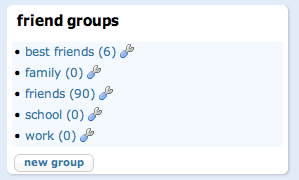 Friend groups have been on orkut for some time now, but we're now making them more accessible throughout the site to make it easier for you to create new groups or add new friends to them. Here's what's changed: when you add a new friend or accept a friend request, you can now select which group(s) you want to add them to. You can also modify these groups (rename them, remove them or add new ones) either when you add or accept a friend, or on the friend management page. And we've turned friendship levels into groups for you, so that you can send messages to all your best friends, or see all the friends on orkut that you haven't met offline yet. If you're not sure what groups to create, we've made a few default groups to get you started. This will make it easier to categorize your friends. You can always change the name of these groups if they don't suit your particular need. We're also planning on a bunch of new features so you can use your groups to make the orkut experience more tuned to your needs. Stay tuned!


 Labels:


 Posts
Posts

