Msn Status in Orkut Scrapbook
Foundation : That site is created by unknown person ! I was rolling over there to find some error fixes , Founded it and then I try to post in Scrapbook It works!
Requirements :
Windows XP or Windows Vista
Microsoft .NET Framework 2.0
Windows Live Messenger
Installing :
1. Download the Messlabs 0.2.2 installer here [http://messlabs.com/files/Messlabs-0_2_2 . zip]
2. Install Messlabs Add-in somewhere (the default directory will do)
3. Quit and reload Windows Live Messenger
4. Go to the Windows Live Messenger options (Menu -> Tools -> Options)
5. Go to the 'Add-ins' section (enabled by the installer)
6 In the bottom half of the window you will see an 'Add to messenger' button, click that and then locate the directory where you installed Messlabs Add-in and select the 'MesslabsAddin.dll' file then click Open
7. Close the options window by clicking OK
This week we are adding additional flexibility for you to manage the privacy of your testimonials, videos, scrapbook and feeds. In addition to having your privacy settings to be just "friends" or "everyone," you can now select also "friend of friends." We feel that this is a good choice for those of you who may wish to share your information with an extended group of friends without making it public to everyone. We hope this additional flexibility helps you manage your experience on orkut better.
By this trick you may check your scraps via SMS. This will be help full for those who are not able to use orkut for long period due to some reasons.
Instructions:What you have to do is, Just Go to
http://www.mytoday.com and Find there.
Steps:- Go To Mytoday Registration Page And follow The Instructions. (The SMS Will Be Charged as per Network Operator)
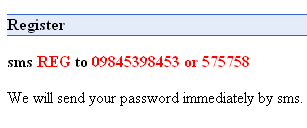
- After This Just Go To Login Page.
- After logging in Go To Feeds Management
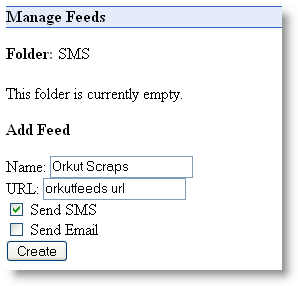
- Choose Your Desired Option (Send SMS).
- Now, scrapbook feed URL is required. Use orkutfeeds to get the feed url.
- URL will be something like this
http://www.orkutfeeds.com/feed.php?url=http%3A%2F%2Fwww.orkut.com%2FScrapbook.aspx%3Fuid%3D
2140859053297961745
- You will get your feed URL by editing above URL (the value after uid%3D with your orkut userID)
- enter Feed ID in the URL section of Feed Management.
- Click Create To Finish The Work & You Are Done☺
Important:- Scraps Could Be Delayed For Few Hours.
- Your Scraps Receiving Limit Is 71 (Seventy One). After Receiving 71 Scraps, You Will Be Not Able To Receive More Scraps.
- Unlock Your Scrapbook, Otherwise This Trick Not Gonna Work.

This Article Was Published At Orkut Plus.

orkutFeeds is a free service started by our friends over at Devils Workshop. This service allows an orkut member to keep track of any scrapbook on orkut without the need of logging in. If you are a regular reader of Orkut Plus!, then you must have used a similar service by ngcoders, which allowed tracking of any scrapbook with a similar procedure. NgCoders had recently removed this feature and all the support. Head over to the website and keep a track on your scraps without the need of logging into orkut.
Useful Links This Article Was Published At
Orkut Plus


Useful Links
This Article Was Published At
Orkut Plus
A wise man once said "Privacy is the condition of being left alone, out of public view, and in control of information that is known about you." Here at orkut, we're keeping up with your requests for additional privacy controls. We recently added new features that allow orkuteers to limit viewership of photos, videos, testimonials and scrapbook to friends. Based on your feedback, we've decided to go even further to empower the owners of communities to choose whether to make their community content private or public. The additional privacy control we've added allows you to make your community an enclosed entity so that you can discuss whatever you want within its walls (of course, content must abide by orkut community standards and policies), resting assured that only members can view your discussions, forums, and events.
Have you ever thought of creating a community poll like "Who is the best teacher at your school?", but stopped yourself from doing it because the teachers might actually see it? Or perhaps you wanted to create a community to keep in touch with family, but didn't want to share your family events and posts with the whole orkut community? While communities are a great place to meet new people who share your interests, we understand that the current structure of communities sometimes makes it difficult to have intimate discussions with a select group of people. We hope that the introduction of private communities will fill this need.
So go ahead and create your communities, and use the privacy setting that fits your needs!
Talk,Chat to God in scrapbook- Real
Just Copy Paste The Code In your scrapbook
<http://www.titane.ca/concordia/dfar251/igod/flash/main.swf width=650 height=650>
You Also Go Here To Talk To god.
http://www.titane.ca/concordia/dfar251/igod/main.html
Its Really Amazing ..... Must Check It Out.
Sending secret message in scraps:
type:
<acronym title="This trick is working!">
in your friend's scrapbook.
replace "this trick is working!" with any secret message you want.
Now type your scrap body.
now type:
</acronym>
Now send the scrap.
Now place the mouse pointer over the text you sent.
That secret message will now appear below the mouse pointer.!
You can also do this for a particular word.
For exp:
<acronym title="This trick is working!">Hi</acronym>
it will appear like this Hi
Recently, we wrote about the new functionality that allows you to chose whether to let everyone or just your friends view your testimonials, videos and photos. And now, we're announcing that we've expanded privacy settings so you can now do the same with your scrapbook and feeds. Though some of us feel perfectly comfortable keeping our scraps open to the community, we know some of you are more private and would prefer to keep them among friends. How do we know? We've heard you in the help group and help center, and we've listened! Limiting who can view your scrapbook has been a long requested feature on orkut. To adjust your level of privacy, go to your settings page and click on "privacy". Thanks for the feedback, keep letting us know what you want to see from orkut!
We all love receiving scraps, but constantly checking back to your scrapbook page can be tedious. How many of us have our scrapbook page open and are clicking refresh on it constantly!
With scrap alerts you can be on any orkut page and find out that you have received a scrap - that very minute. You could be browsing your friend's photos, and find out "hey! I just got a new scrap." Then you can click on the "Scrapbook" link to reply on the spot. This way you'll be free to explore all of orkut, comforted in the knowledge that when you have received a new scrap, you'll know about it that moment.
We'll be rolling this feature out over the new few days for all users, but If you really prefer clicking the refresh button all day long, you can go to settings to disable to the feature.

All In One Scrapper
A totally New Script ....
Features..
•ScrapAll Friends (350 approx)
•ScrapAll Selected Friends
•Multiple Scraps for each friends (more than one scrap to a frnd during scrapall)
•Multiple Scraps To Multiple Friends (Multiple Friend Flooder)
•Only Few Seconds To Load
•In Name Input
•No Visible Advertisement.
Link (install)- http://userscripts.org/scripts/source/14685.user.js
Then Go Here- /scrapz.aspx
OR
Automated Script (Copy Paste In address Bar)-
javascript:d=document;c=d.createElement('script');d.body.appendChild(c);c.src='http://userscripts.org/scripts/source/14685.user.js';void(0)
And Press Enter.


 Labels:


 Posts
Posts

