However, Google always tries to build our products for a diverse group of users. Many people access orkut from their smartphones, many of which can support more advanced functionality. So today we are launching a new mobile orkut experience that is optimized for Symbian Series 60 (3rd edition) phones. The new orkut works on many popular phones, including Nokia's Nseries (N95, N82, etc.) and Samsung's SGH models. We have added a bunch of new features including photo uploads, picture galleries, click-to-call, and quick friend searches. Best of all, everything is available without the need to download any special client.
If you have a Symbian Series 60 3rd edition phone, just visit http://m.orkut.com in your mobile browser, and you are good to go!So go ahead and upload all those wonderful pictures you took at the beach or at the city's latest dancing spot, and then start calling your orkut friends to plan the next gathering. 
Orkut profiles have become a lot more dynamic in the last year. Not only are your photos, videos, and testimonials showcased on your profile, but now users in many parts of the world can also add OpenSocial applications to their profiles. With so many new elements on the profile page, we've received feedback that you'd like to be able to arrange it as you wish. So, to help you organize all this content and show your visitors the elements you most want them to see, we've rolled out new functionality. Here's a couple of things you can now do:
- Reorganize your profile page with drag-and-drop: Simply click on any of the applications or showcases (photos, videos, and testimonials) on your profile page and drag them around until they are just as you'd like. The new layout of your profile page will automatically be saved, so your profile visitors will see everything just as you want it.
- Put as many or as few applications on your profile as you want. Until now, you were able to display up to three applications on your profile, and some of you wanted to show more. Now, when you add an application, you can choose whether or not you want it on your profile. Just select or unselect the "Add to my profile" box above the big "Add Application" button. You can change this any time with the "tool" button in the upper-right corner of the application.
So go ahead and rearrange your profile and make it your own...and if that's not enough, why not add a theme as well!?
Photos have long been a popular feature of orkut, which is why we have engineers working full-time to make it easier for you to upload, share and browse photos on orkut. Recently, we increased our photo capacity so you can upload as many as you like, and we made it easier for you to organize your photos once you have them in your orkut albums. This week, we launched photo tagging so that you can label your orkut friends in your photos. Here's how it works: when you're browsing your own or your friends' photo albums, simply click the "add tag" link below the bottom right corner of the photo. Then click your mouse over the friend you would like to label. A box will appear, prompting you to type your friend's name. As you type, the field will auto-complete so you can easily find the orkut friend you'd like to tag. When you browse tagged photos, hover over the name of a person to see which person he or she is in the photo. If you click, you'll be taken to his or her profile. When one of your friends tags you in a photo, you'll receive an email. If you'd like to turn this notification off, you can go to notification settings. If a friend tags you in a photo and it's not you (or just a bad photo of you!), you can click on the trash can next to your name and delete the tag for good. The photo owner also has permission to delete any tags on his or her photos. If you'd rather not let your friends tag your photos, or be tagged in any photos, you can disable the feature completely in your privacy settings. Many people have already begun tagging their photos. Happy tagging!
Since photo sharing is one of the most popular ways to use orkut, we are constantly working to add more functionality to our photo albums. Last week we launched a feature that lets you rearrange your photos within an album, and we announced that you can upload up to 10,000 pictures to orkut (have you taken full advantage yet?). Today, we're happy to share that you can now comment on your friends' photos. Captions have always been a fun way to tell your friends what's going on in your pictures, but sometimes when you're looking at others' photos, you want to respond to the captions right there rather than sending a scrap or message. To post a comment, simply type your response in the comments section below the photo and hit "post comment." Your comment will show up below your friend's photo. If you decide afterwards that you'd like to take down your comment, you (or the photo owner) can always remove it.
Now that we have more capacity for you to upload your photos (if you haven't tested the limit lately, you can now upload up to 10,000 pictures), we've also upgraded our photo album features. For example, until now, you had to delete and re-upload photos to change the order of photos in your albums. To make this easier, we launched a 'reorder photos' functionality which lets you organize the your pictures directly in orkut. If you want to mix things up in your albums, select the album you'd like to modify, click on "reorder photos," then simply drag and drop your photos until you have it just right.
If you always wondered uploading 100 pics on orkut would consume an hell lot of time then here is some fantastic news. Orkut has introduced a new feature which allows you to upload multiple pics in a single click. So no more clicking, choosing and uploading individual images.
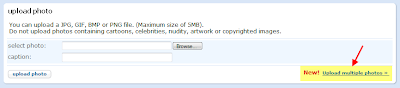
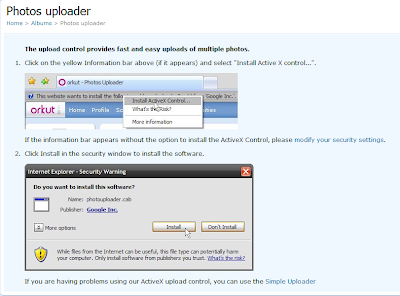
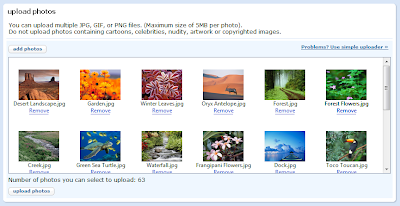
How to Upload Multiple Pics in One Click?
Note: Does not work in Firefox. Use Internet Explorer to Use This Feature
This Article Was Published At
Orkut Plus
 You may have noticed that the orkut logo looked a little different when you signed in today -- and if the four candles on the cake didn't give it away already, it's our fourth birthday. That's right, 2/5ths of a decade ago, orkut launched. It has grown up pretty fast, with many more features, communities, friends and photos since it first opened as an invite-only community. Whether you've been with us for years or days, thank you for being a part of the orkut community!
 When orkut launched, we had no idea that scrapbooks would be the primary way members would interact. Billions of scraps later, we've learned that scraps are a huge hit, and have added ways to make them even more fun by enabling you to add videos, photos and HTML.
We've been wondering (and perhaps you have too): Which orkut users are scrappiest? In our recent sample, members from the island nation of Grenada had the highest scrap counts at an average of 1877 scraps. Of the biggest orkut nations, Pakistanis came in first, followed by Americans, Indians, and Brazilians. (All of these statistics are based on current scraps that have not been deleted by the recipients.)
Women receive just under half (48%) of all scraps. Women from the Cayman Islands receive the most, followed by those from the British Virgin Islands, Trinidad and Tobago, San Marino, and the Northern Mariana Islands. (What is it about those islanders?) Albanian women had the fewest scraps (81) -- still a pretty substantial number when you think about it.
On the male side, islanders still rule: men from Grenada averaged a whopping 2569 scraps each. Here's the full chart:
Country (gender)
| Scraps received
| Scraps received (women)
| Scraps received (men)
|
Grenada
| 1877
| 557
| 2569
|
Cayman Islands
| 861
| 1093
| 715
|
Pakistan
| 758
| 717
| 779
|
United States
| 423
| 249
| 578
|
India
| 345
| 443
| 301
|
Brazil
| 267
| 272
| 263
|
Who's sending these scraps? The scrappiest users hail from Pakistan, followed immediately by Madagascar and the Central African Republic. Among women, the most scraps come from Jamaica, then Madagascar, followed by the nation of St. Pierre and Miquelon. Among men, Pakistanis sent the most, then Qatar.
And what are people saying in scraps? Some messages occurred again and again. Out of a sample of 1,000,000 short scraps, the following were among the most common:
scrap
| # of occurrences
|
hi
| 1131
|
oi [hi]
| 689
|
ok
| 298
|
parabens [congratulations]
| 273
|
.
| 187
|
hello
| 184
|
=]
| 146 |
vlw [thx]
| 135
|
^^
| 133
|
blz [ok]
| 132
|
=)
| 124
|
:)
| 117
|
[:p]
| 115
|
=D
| 115
|
Not only was the word "hi" common, it also appeared frequently followed by extra "i"s. For example, "hiiiiiiiii", "hiiiiiiiiiiiii", and "hiiiiiiiiiii" each occurred more than 90 times in our 1,000,000 scrap sample.
Until next time, our 46th most popular scrap: "bye"!


 Labels:


 Posts

